Efficiently Generating PDF Documents Using .NET 8 in 6 Easy Steps
Mar 6, 2024
Harness the power of .NET to create PDF documents from HTML with ease.

If you’re a .NET developer working on ASP.NET Core applications and need to generate high-quality PDF files, you’re in the right place. Whether it’s an invoice document, complex reports, or any new PDF document with dynamic content, PDF generation tasks are a common requirement across web applications today.
In this article, you’ll learn how to create PDF documents from HTML markup using .NET 8 in Visual Studio, with a clean 6-step implementation using both DinkToPdf (an open source library) and IronPDF (a powerful commercial .NET library). You’ll gain full control over the final document structure, enabling you to generate sophisticated PDF documents that meet various business needs.
Why Use a .NET PDF Library?
There are several third-party libraries available for .NET applications that support PDF conversion, but DinkToPdf and IronPDF stand out.
DinkToPdf: Lightweight and Open-Source
DinkToPdf is a .NET port of the wkhtmltopdf command line tool, using the WebKit rendering engine to convert HTML content into PDFs. It’s ideal for simple use cases and works great in server-side environments.
Key Benefits:
- Free and open-source PDF generator
- HTML to PDF conversion with minimal configuration
- Supports web pages, Razor templates, and static HTML content
- Integrates smoothly with the .NET Core and .NET framework
- Good documentation and community support
Downsides: You may encounter file path or DLL dependency issues, and JavaScript rendering is limited.
Looking for More Features? Meet IronPDF
While DinkToPdf works great for basic use cases, IronPDF offers a more modern full-featured solution. Its commercial software designed specifically for .NET developers, with rich HTML-to-PDF rendering, no reliance on native binaries, and a much smoother development and deployment experience, especially for .NET 8 and cross-platform apps. With IronPDF, you can easily handle various PDF generation tasks as well as PDF manipulation.
Why consider IronPDF?
- No external dependencies or DLL management needed
- Provides an easy-to-use, fluent API
- Supports full modern HTML5, CSS3, and JavaScript right out of the box
- PDF editing, annotations, headers/footers, forms, and other advanced feature support
- Works on Windows, Linux, Docker, Azure, and AWS
Pro Tip: You can swap in IronPDF with minimal code changes if you outgrow DinkToPdf
.NET Create PDF Documents: A Step-by-Step Guide
Step 1: Install The DinkToPdf Package
Using the NuGet Package Manager Console, run the following:
dotnet add package DinkToPdf📦 Don’t forget to include the required native libwkhtmltox files. You can find them in the official GitHub repo.
Step 2: Define a PDF Service Interface
Create an abstraction for your PDF generation logic.
public interface IPdfService
{
    string GetHtmlTemplate();
    byte[] CreatePdf(string html);
}
This makes your service testable and flexible to swap implementations later (like replacing DinkToPdf with IronPDF).
Step 3: Implement the Services Using DinkToPdf
public class PdfService : IPdfService
{
    private readonly IConverter _converter;

    public PdfService(IConverter converter)
    {
        _converter = converter;
    }

    public string GetHtmlTemplate()
    {
        return "<h1>Hello from PDF!</h1><p>This is generated using DinkToPdf.</p>";
    }

    public byte[] CreatePdf(string html)
    {
        var doc = new HtmlToPdfDocument
        {
            GlobalSettings = { PaperSize = PaperKind.A4 },
            Objects = { new ObjectSettings { HtmlContent = html } }
        };
        return _converter.Convert(doc);
    }
}
Register is in Program.cs
builder.Services.AddSingleton<IConverter>(new SynchronizedConverter(new PdfTools()));
builder.Services.AddScoped<IPdfService, PdfService>();
Step 4: Implement HTML Generation Logic
You can build the HTML markup manually or load from external files, Razor views, or even a content management system. This allows you to create complex layouts and handle various document types with ease.
Step 5: Generate the PDF
The CreatePDF function takes HTML content and returns a byte array. This can be saved or returned directly via HTTP.
public byte[] CreatePdf(string html)
{
    var doc = new HtmlToPdfDocument()
    {
        GlobalSettings = new GlobalSettings { PaperSize = PaperKind.A4 },
        Objects = { new ObjectSettings { HtmlContent = html } }
    };

    return _converter.Convert(doc);
}
Step 6: Build the API Endpoint
[ApiController]
[Route("api/[controller]")]
public class PdfController : ControllerBase
{
    private readonly IPdfService _pdfService;

    public PdfController(IPdfService pdfService)
    {
        _pdfService = pdfService;
    }

    [HttpGet("generate")]
    public IActionResult GeneratePdf()
    {
        var html = _pdfService.GetHtmlTemplate();
        var pdf = _pdfService.CreatePdf(html);
        return File(pdf, "application/pdf", "example.pdf");
    }
}
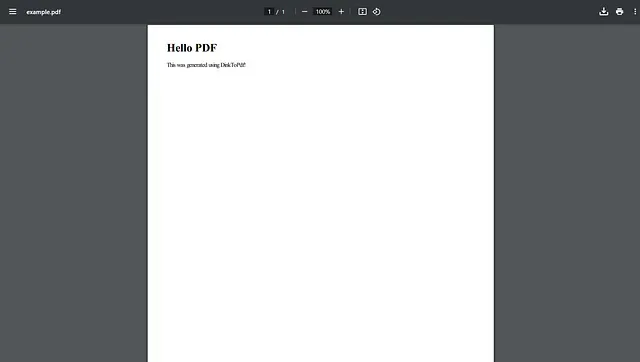
Test is using Postman, Swagger, or your browser. If the PDF generated successfully, you should see a clean, downloadable PDF file.
Output PDF
Want to Try IronPDF Instead?
Here’s how the same logic looks using IronPDF (install using Install-Package IronPdf):
using IronPdf;

public class IronPdfService : IPdfService
{
    public string GetHtmlTemplate()
    {
        return "<h1>Generated with IronPDF</h1><p>Supports modern HTML and CSS!</p>";
    }

    public byte[] CreatePdf(string html)
    {
        var Renderer = new ChromePdfRenderer();
        var pdf = Renderer.RenderHtmlAsPdf(html);
        return pdf.BinaryData;
    }
}
You don’t need to manage any native libraries — just install and go. Plus, IronPDF supports advanced features like digital signatures, watermarks, form field handling, and full document editing (often all in just a few lines of code).
Final Thoughts
If you’re starting out and need a quick, open-source solution, DinkToPdf is a fantastic tool. But if your application demands commercial support, cross-platform deployment, and high fidelity rendering, consider switching to IronPDF for a smoother, more powerful experience.
Thanks for reading! Whether you’re working with open-source tools, or exploring premium libraries, PDF generation in .NET 8 is easier than ever.
Try IronPDF for Free
If you’re looking for a more powerful and developer-friendly alternative to DinkToPdf, IronPDF is a great choice. It offers full .NET 8 support, rich HTML-to-PDF rendering, and robust error handling — without the hassle of unmanaged dependencies.
👉 Download the free trial of IronPDF and start creating PDFs in your .NET projects with just a few lines of code.
my repository use DinkToPdf : https://github.com/Hu8MA/App_WebApi
Thanks for taking the time to read this 😊😊