From Big Data to the Cloud, Part 2.1 — Inside Hadoop: HDFS and MapReduce
Nov 1, 2026
A calm, sequential guide for anyone entering the field. The article is divided into smaller chapters to make it easier to understand.
Part 1 built the problem, and it built it carefully. Data has grown too large, too fast, and too varied for traditional tools. A single powerful machine breaks in five places, and every one of those breaking points reduces to three questions — storage, processing, and scalability. The way out was to stop making one machine bigger and use many ordinary machines together: a cluster. But the cluster came with a bill of its own. The moment data is spread across many machines, we must answer three new questions: which data lives on which node? How do the nodes communicate and coordinate? And what happens when a machine crashes — which, in a large cluster, is normal?
Part 1 ended by meeting Hadoop at a glance, as a name for each answer: HDFS for storage, MapReduce for processing, YARN for resource management, Hadoop Common for the shared plumbing. But a name is not an explanation. Part 2 opens each component and looks at it from the inside, across two articles. This one — Part 2.1 — takes the two components that touch the data directly. HDFS shows how a file is cut into pieces, spread across machines, and still never lost when a machine dies. MapReduce shows how that data is processed in parallel without being dragged across the network. Part 2.2 then takes the component that keeps everyone in order — YARN — and follows a single job through the cluster from submission to finish.
The questions from Part 1 do not change. What changes is that we now watch them being answered, one mechanism at a time.

Chapter 1: Hadoop as a Layered Stack
Four Components, Four Jobs
Before we open anything, it is worth fixing the map we will be reading from. Hadoop’s core is made of four components, and each one has exactly one job.
| Component | Role | Simple meaning |
|---|---|---|
| HDFS | Storage | Where the data lives |
| MapReduce | Processing | How the data is processed |
| YARN | Resource management | Who gets which CPU and memory |
| Hadoop Common | Shared utilities | Libraries all the others use |
Why “Stack”
These four are not side by side; they sit on top of one another. HDFS is at the bottom, because everything else needs the data to be somewhere first. YARN sits above it, managing the cluster’s CPU and memory. MapReduce sits on top, because a processing job needs both data to read and resources to run on. Hadoop Common runs alongside all three, since every layer relies on its shared libraries.
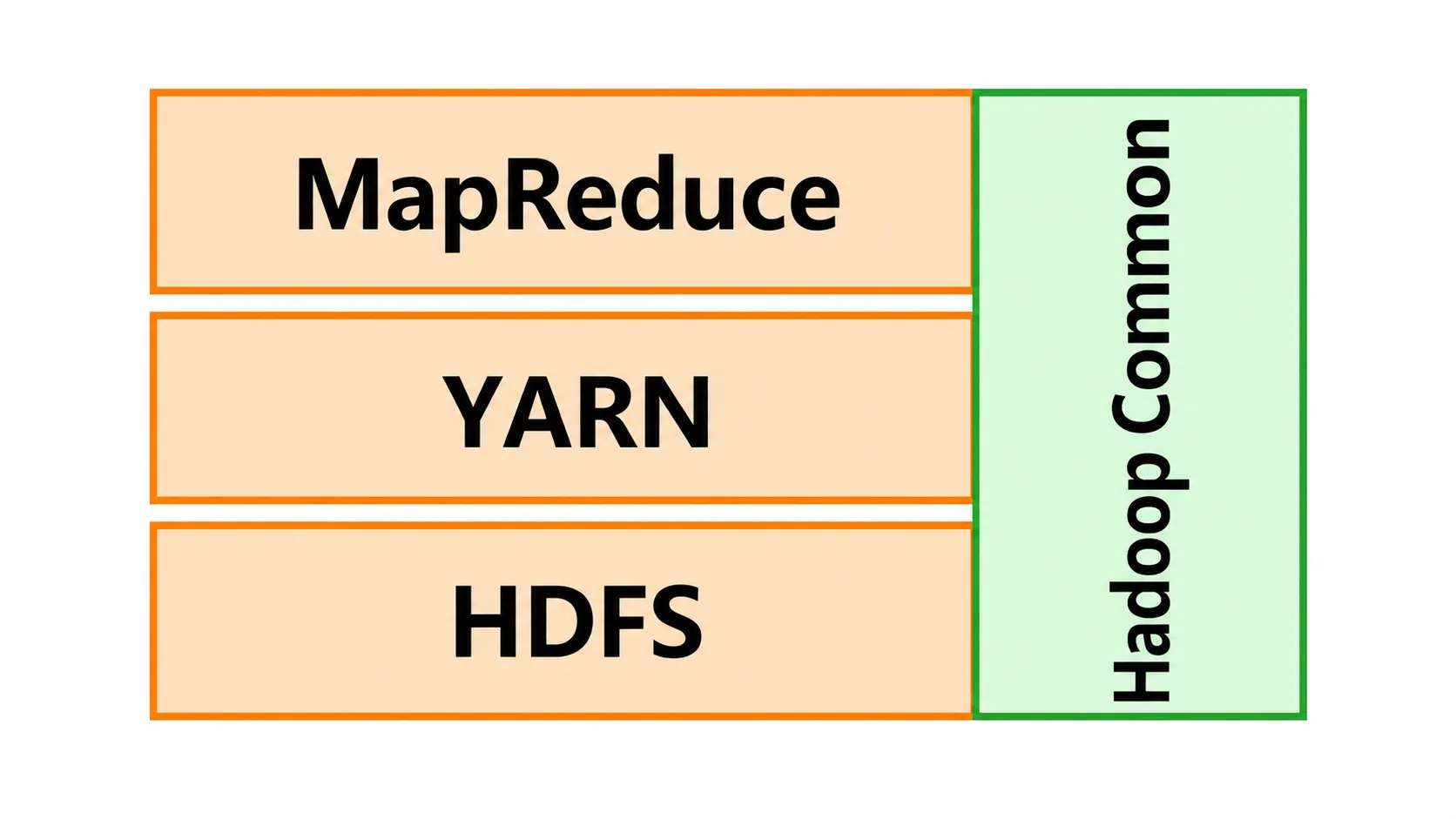
We climb the stack in the order the problems arise. First the data must be stored — that is HDFS, the next chapter. Then it must be processed — that is MapReduce, the chapter after. The layer between them, YARN, which shares the cluster’s resources between everyone who wants to process something, gets its own article in Part 2.2.
Chapter 2: HDFS — Where the Data Lives
Hadoop’s Primary Storage
HDFS, the Hadoop Distributed File System, is Hadoop’s primary storage system. It answers the first new question from Part 1 — which data lives on which node? — and it begins with a simple move: large files are split into blocks, and the blocks are spread across many machines.
Blocks
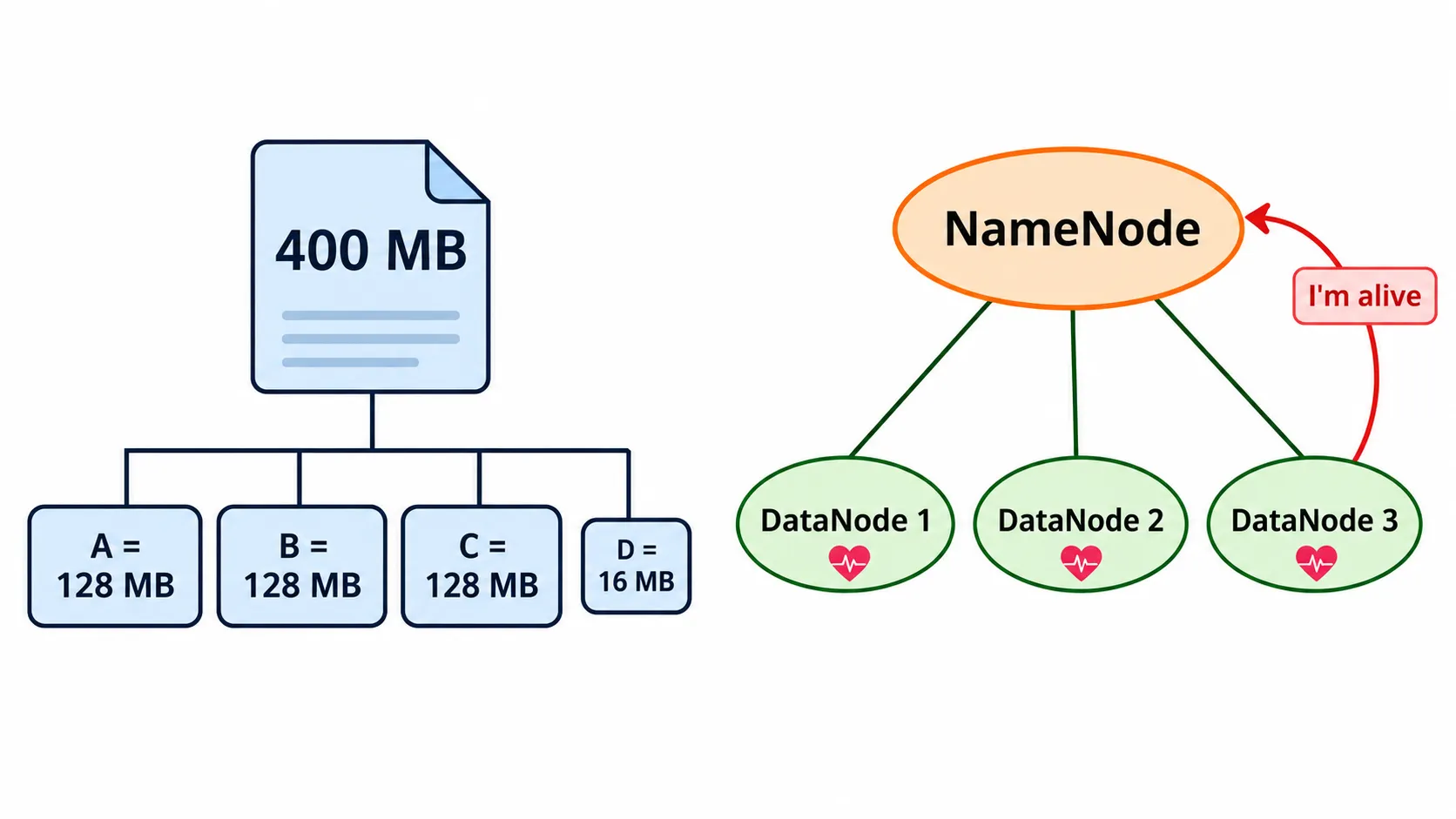
The default block size is 128 MB in Hadoop 2 and later (it was 64 MB in Hadoop 1). A file is cut into as many full 128 MB blocks as fit, and whatever is left over becomes one final, smaller block.
Take a 400 MB file. Three full blocks use up
which leaves
for a fourth block. So the file becomes 4 blocks: A, B, and C of 128 MB each, and D of 16 MB.
It is worth being exact about why the blocks are so large, because it is a common source of confusion. Something has to remember where every block lives, and the fewer blocks there are, the less there is to remember. Large blocks mean less metadata to track. If the same 400 MB file were cut into tiny pieces, it would turn into a long list of entries to keep track of; at 128 MB, it is four.
The Master and the Workers
Splitting a file into blocks creates the obvious next question: once block A is on one machine and block D is on another, who remembers that? HDFS answers with a master–slave design, and the two roles are kept strictly apart.
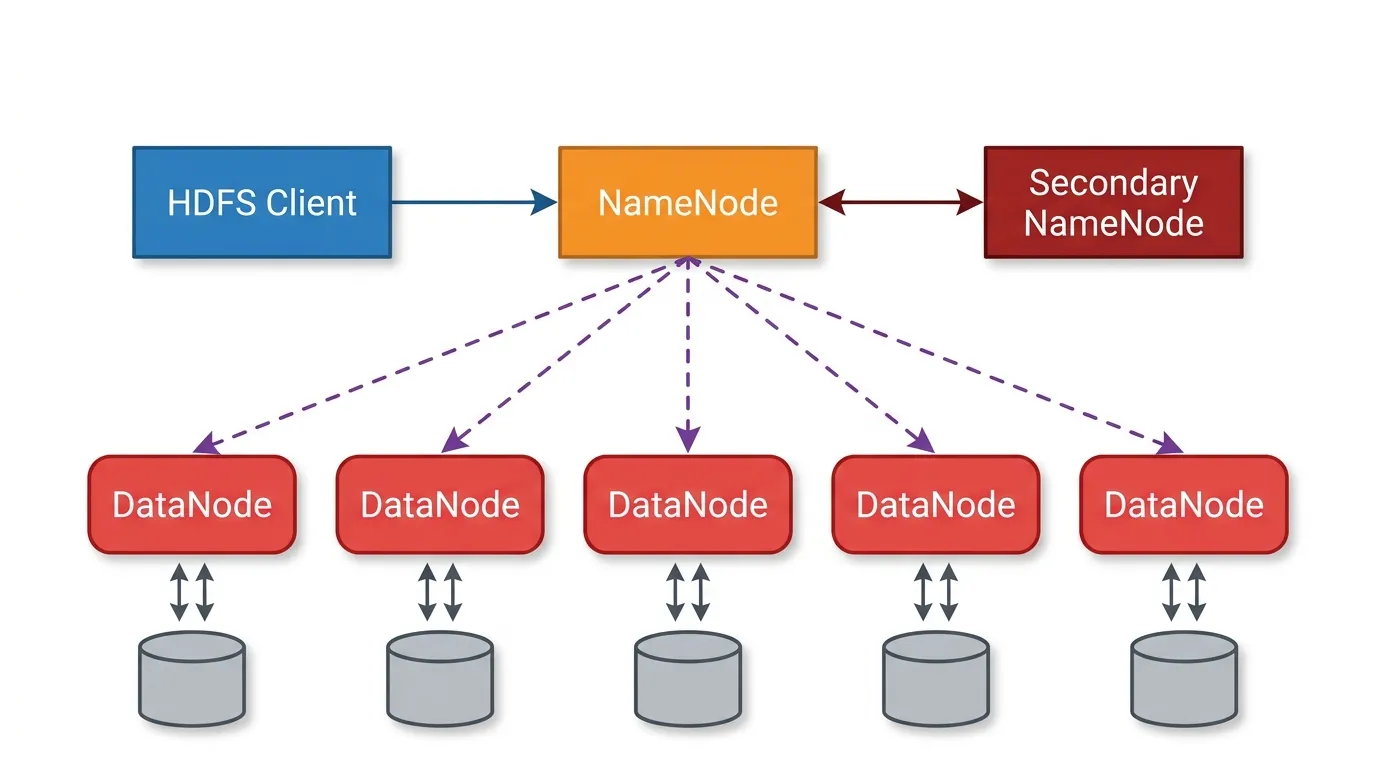
- The NameNode (master) stores the metadata: file names, permissions, and which block is on which machine. It stores no actual data.
- The DataNodes (slaves) store the actual data blocks and handle read and write requests.
The split is the whole idea. The NameNode is the cluster’s index — it knows where everything is but holds none of it. The DataNodes are the shelves — they hold everything but need no knowledge of the bigger picture. This is the precise answer to Part 1’s first question: which data lives on which node is a question you ask the NameNode.
The Heartbeat
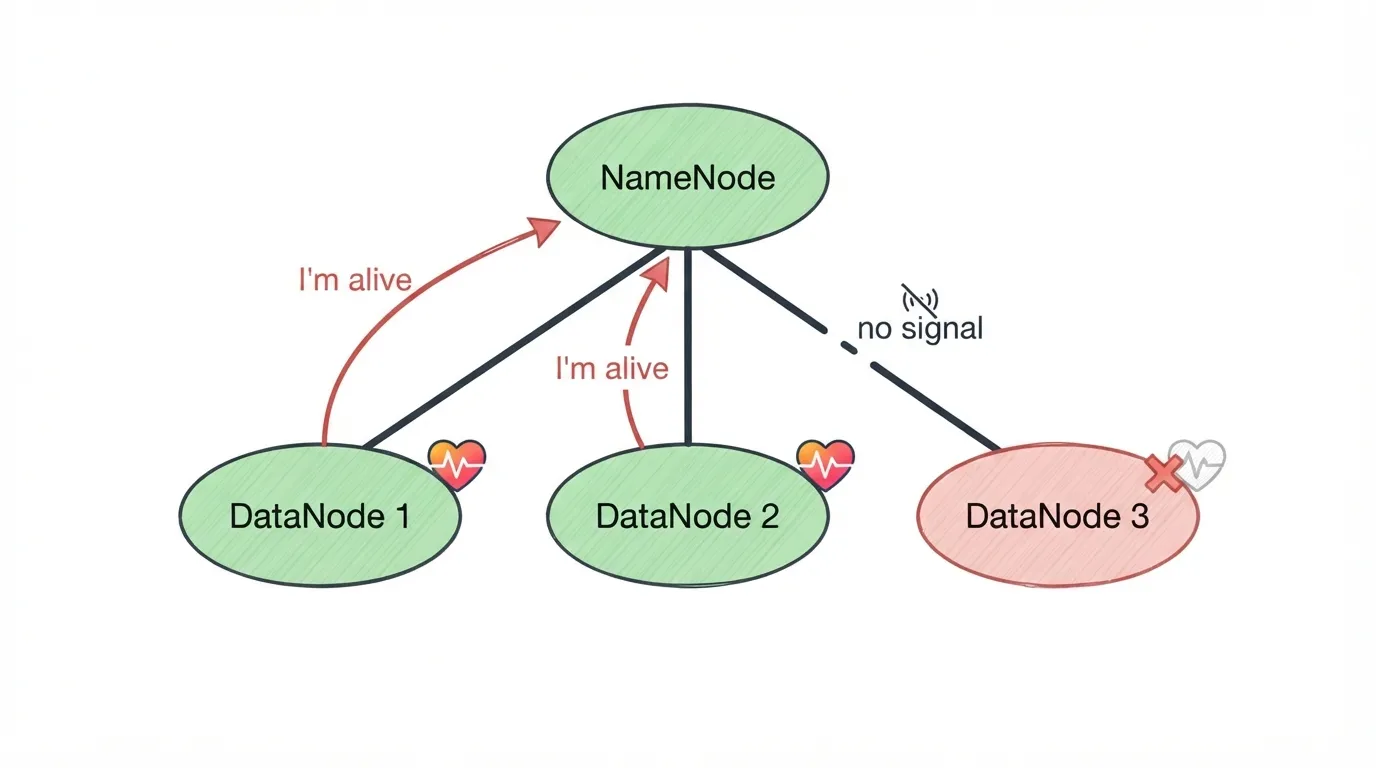
The NameNode keeps a map of where every block lives, but a map is only useful if the places on it still exist. So every DataNode sends the NameNode a heartbeat every 3 seconds — a small message that says, in effect, “I’m alive.”
This is how the cluster notices failure without anyone watching it. As long as the heartbeats arrive, the NameNode knows its DataNodes are healthy. When a DataNode’s heartbeats stop, the NameNode knows that machine is gone — and, because it holds the map, it knows exactly which blocks were on it.
Replication
Knowing a machine is gone is only half the answer to Part 1’s third question. The other half is not losing anything when it goes. HDFS’s answer is replication: every block is stored more than once, on different nodes.
The default replication factor is 3 — the block plus two copies, each on a different machine. Return to our 400 MB file. It was 4 blocks, but with three copies of each, the cluster actually stores
Now the heartbeat and replication work together. If a DataNode fails, the data on it is not lost; it is simply read from another copy on another machine. That is fault tolerance, and it is exactly what Part 1 demanded of any system where failure is normal.
Fault tolerance is not free, and the same arithmetic shows its price. Part 1 listed it among Hadoop’s limitations: replication uses extra storage space. Our 400 MB file occupies
of raw disk across the cluster. HDFS pays for safety in disks.
What If the NameNode Fails?
Replication protects the DataNodes. But look again at the design: there are many DataNodes, and only one NameNode — and it holds the only map of where everything lives. That makes the NameNode a single point of failure. If it goes down, the whole cluster is inaccessible: the blocks are all still sitting safely on the DataNodes, but nobody knows which block is where.
Two mechanisms address this, and it is worth keeping them apart, because their names invite confusion.
The Secondary NameNode periodically saves a checkpoint of the NameNode’s metadata, which helps recovery. Despite its name, it is not a live backup that takes over automatically. If the NameNode fails, the Secondary NameNode does not step in; it simply holds a recent copy of the map to recover from.
High Availability (HA) is the setup that actually keeps the cluster running. It pairs an Active NameNode with a Standby NameNode. If the active one fails, the standby takes over, and the cluster keeps running.
A note on the two names. The word “secondary” makes it tempting to read the Secondary NameNode as a spare that waits to replace the master. It is not. Read it as a helper that takes snapshots of the map. The node that genuinely replaces a failed NameNode is the Standby in an HA setup. Checkpoint helper versus live replacement — that is the whole distinction.
HDFS at a Glance
| Question | HDFS’s answer |
|---|---|
| Which data lives on which node? | The NameNode keeps the map of which block is on which machine |
| How do we notice a machine has failed? | DataNodes send a heartbeat every 3 seconds; silence means failure |
| How do we avoid losing data when it does? | Every block is replicated 3 times on different nodes |
| What if the map itself is lost? | Secondary NameNode checkpoints; HA adds a Standby that takes over |
The data now lives safely on many machines. The next question is how to use it.
Chapter 3: MapReduce — Processing Without Moving the Data
The Programming Model
MapReduce is Hadoop’s programming model for processing data in parallel on many nodes. Its single most important idea is in the way it treats the network. The data is already spread across the DataNodes, in blocks of 128 MB. Copying all of it to one machine to process it would recreate exactly the bottleneck Part 1 escaped from. So MapReduce does the opposite: the program runs on the nodes where the data already is.
Move the code to the data, not the data to the code. A program is small; the data is huge. Sending the small thing to the big thing is the whole trick.
Three Phases
A MapReduce job runs in three phases.
- Map: each node processes its own piece of the data and outputs key–value pairs.
- Shuffle & Sort: pairs with the same key are grouped together.
- Reduce: the grouped pairs are combined to produce the final result.
The final output is written back to HDFS, so it is stored, replicated, and protected exactly like any other data. MapReduce programs are traditionally written in Java.
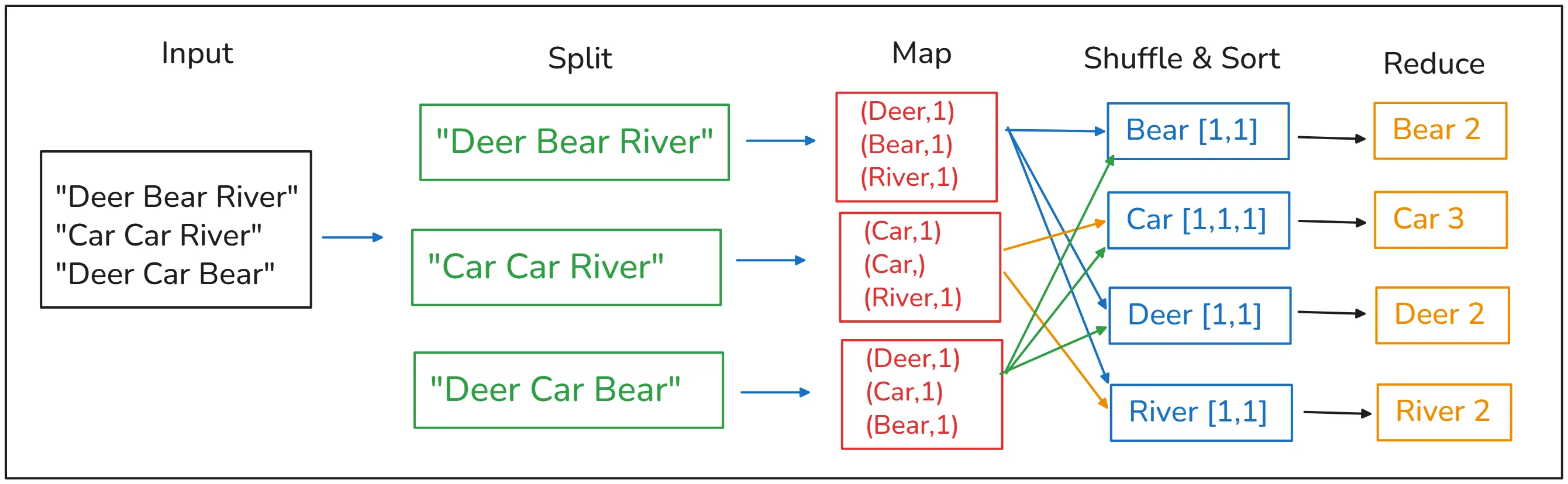
That description is accurate but abstract. The way to understand it is to run it by hand, so we take two examples, one at a time.
Example 1: Word Count
The input file has three lines:
Deer Bear River
Car Car River
Deer Car Bear
We want to count how many times each word appears.
Split. The three lines go to three different nodes — one line each. In a real cluster, each node would be holding its own block; here each line plays the part of a block.
Map. Each node reads only its own line and, for every word it sees, outputs the pair (word, 1). Nothing is added up yet; each word simply announces that it appeared once.
| Node | Its line | Map output |
|---|---|---|
| Node 1 | Deer Bear River | (Deer,1) (Bear,1) (River,1) |
| Node 2 | Car Car River | (Car,1) (Car,1) (River,1) |
| Node 3 | Deer Car Bear | (Deer,1) (Car,1) (Bear,1) |
Notice that Node 2 outputs (Car,1) twice. The mapper does not try to be clever; it reports each occurrence separately and leaves the adding to a later phase.
Shuffle & Sort. Now the pairs are regrouped by key. Every value for the same word is collected into one list, no matter which node produced it:
- Bear → [1, 1]
- Car → [1, 1, 1]
- Deer → [1, 1]
- River → [1, 1]
This is the only phase where data genuinely crosses between nodes — and notice what crosses: not the original text, only small key–value pairs.
Reduce. Each list is combined by adding it up:
- Bear 2 · Car 3 · Deer 2 · River 2
Check it against the input: “Car” appears twice on line 2 and once on line 3 — three times. The answer is correct, and no single node ever saw the whole file.
Example 2: Average Age per Department
The second example is closer to real work. A students file is split across two DataNodes:
| DataNode 1 | DataNode 2 |
|---|---|
| Ahmed, IT, 20 | Sara, CS, 22 |
| Ali, CS, 21 | Omar, IT, 24 |
We want the average age in each department.
Map — the key is the department, the value is the age. Each node turns its own records into pairs:
- Node 1 → (IT, 20) (CS, 21)
- Node 2 → (CS, 22) (IT, 24)
Shuffle & Sort (across nodes) — the pairs are grouped by department. This time the grouping genuinely needs both nodes, because each department has one student on each:
- IT → [20, 24]
- CS → [21, 22]
Reduce (average) — each list is averaged:
This example makes visible why the shuffle exists at all. Node 1 holds only one IT student, and so does Node 2. Neither node, on its own, could compute the IT average; each would report the age of a single student as if it were the answer. The average is only correct once all the values for a key have been brought together in one list. Map works locally; Reduce needs the full picture for its key; the shuffle is the bridge between them.
Stated as a General Rule
Both examples follow the same pattern. Map does the work that can be done locally, on each node’s own data, in parallel. Shuffle & Sort brings together everything that belongs together, by key. Reduce combines each group into a result. Whatever the question — counting words, averaging ages — the craft of writing a MapReduce job is choosing the right key, so that everything the reducer needs ends up in the same group.
Where We Stand
It helps to set what this part answered against the three questions Part 1 left us with.
| Problem from Part 1 | Answered by | Mechanism |
|---|---|---|
| Which data lives on which node? | HDFS | 128 MB blocks; the NameNode keeps the map |
| What happens when a machine crashes? | HDFS | Heartbeats every 3 seconds; 3 copies of every block; HA |
| How do we process it fast enough? | MapReduce | Map in parallel, shuffle by key, reduce — code moves to data |
| How do nodes communicate and coordinate? | Not yet | → Part 2.2 |
Two of the three new problems are solved, and processing has a model. But one row is still open, and if you read the MapReduce examples closely, you can feel the gap. We kept saying “the program runs on the node that holds the data” and “the three lines go to three different nodes.” Who sends them? Who decides which machine runs which task, how much CPU and memory each task may use, and what happens when several jobs want the same machines at the same time? So far, we have simply assumed it happens.
What Comes in Part 2.2
Part 2.2 pays that assumption off. It opens the last core component, YARN — Yet Another Resource Negotiator — the layer that sits between HDFS and MapReduce in the stack and decides who gets which CPU and memory. We meet its four parts: the ResourceManager that oversees the whole cluster, the NodeManager on every machine, the ApplicationMaster that each job gets as its own manager, and the container in which a task actually runs. We draw the map of who is inside whom — which of all these pieces lives on which machine — and see why every worker runs both a DataNode and a NodeManager.
Then we put every piece of Part 2 to work at once, and follow a single job through the cluster in six steps, from the moment it is submitted to the moment it finishes. That walk-through is where the principle behind this whole part finally becomes visible as a sequence of messages between machines: Hadoop moves the work to the data, not the data to the work.
References
- Deshpande, T., Karanth, S., & Turkington, G. Hadoop: Data Processing and Modelling (Learning Path). Packt Publishing.
- Oracle. What Is Big Data? https://www.oracle.com/big-data/what-is-big-data/
- Big Data — Understanding Hadoop: Architecture, Features, Challenges & Applications. Medium. https://medium.com/@rp99452/big-data-understanding-hadoop-architecturefeatures-challenges-applications-c7ab7011e375
- Mehta, C. B. (2022). A Comprehensive Review of Hadoop Ecosystem for Big Data Processing and Analytics. IJNRD, 7(10).